
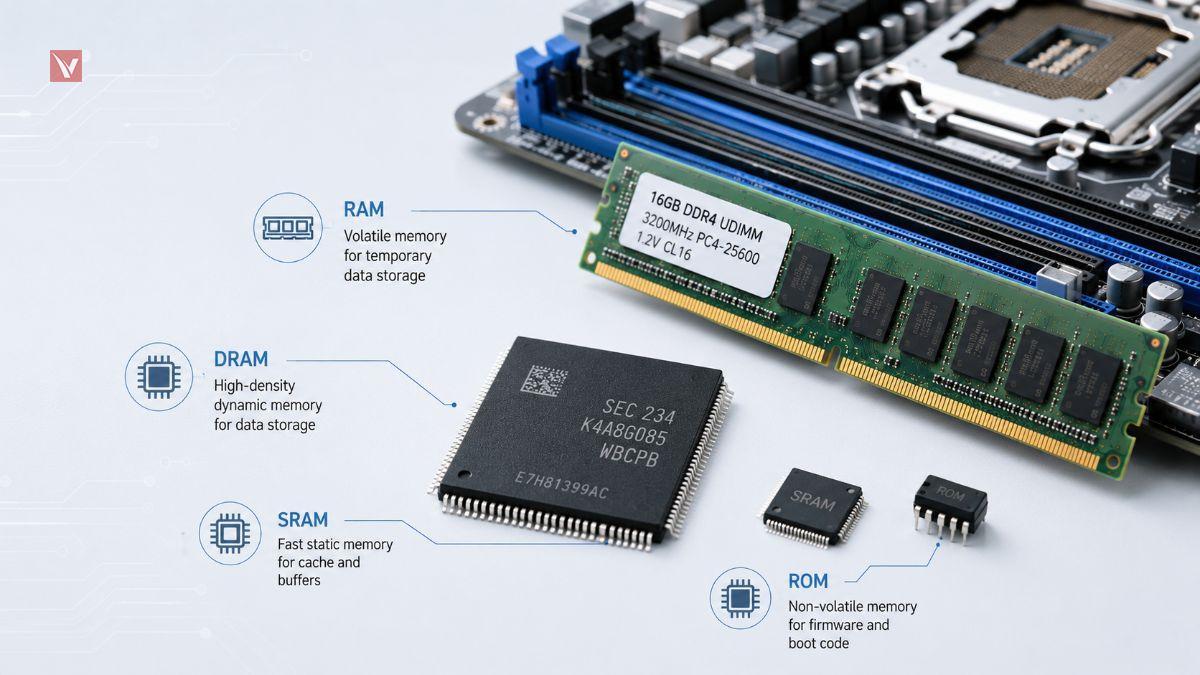
Memory chips determine how fast your system responds, how many tasks it can run at once, and how safely your data is stored over time. In modern PCs, servers, and embedded systems, understanding memory technologies is essential for both performance tuning and reliable hardware design.
What Is a Microchip in a Computer
When people talk about “microchips” in a computer, they are usually referring to integrated circuits (ICs) built on a small slice of semiconductor material, most often silicon. These ICs pack millions or even billions of tiny components—such as transistors, resistors, and capacitors—onto a single die to implement complex electronic functions.
Inside a typical computer you will find multiple kinds of microchips, each responsible for a specific role. The central processing unit (CPU) executes instructions, the graphics processing unit (GPU) accelerates visual workloads, and various logic and controller chips coordinate input/output and peripherals.
Memory chips form another critical family of microchips, dedicated to storing code and data so that other components can access them efficiently.
How Do Semiconductor Microchips Actually Work
At the heart of every microchip is the semiconductor material, most commonly crystalline silicon, which has properties between those of a conductor and an insulator. By introducing controlled impurities (a process called doping), engineers create regions of n‑type and p‑type silicon that can form diodes and transistors. Transistors are the fundamental switching elements that represent binary states: on and off, or logically 1 and 0.
Digital microchips implement logic functions and memory cells using vast arrays of these transistors connected in carefully designed patterns. When a specific combination of transistors switches on, it allows current to flow and produces a logical 1 at some node; when they switch off, the node is interpreted as 0. Memory chips use these binary states to store bits: millions or billions of cells, each holding one bit, are organized into words, pages, and banks to provide structured access for the CPU and other controllers.
Essential Functions of Memory Chips for Computers
In a modern computer architecture, memory chips act as the bridge between fast processors and relatively slow storage or external interfaces. The CPU can only work on data that is accessible at very high speed; if it had to wait for hard drives or network storage for every operation, performance would collapse. High‑speed volatile memory (RAM) solves this problem by buffering active data and instructions close to the processor.
Non‑volatile memory chips complement this by storing firmware, configuration data, and user information even when power is removed. BIOS or UEFI firmware resides in dedicated ROM or flash chips, ensuring that a system can boot and initialize hardware correctly. SSDs and embedded flash devices further extend this role, acting as mass storage that combines semiconductor reliability with higher throughput than traditional mechanical disks.
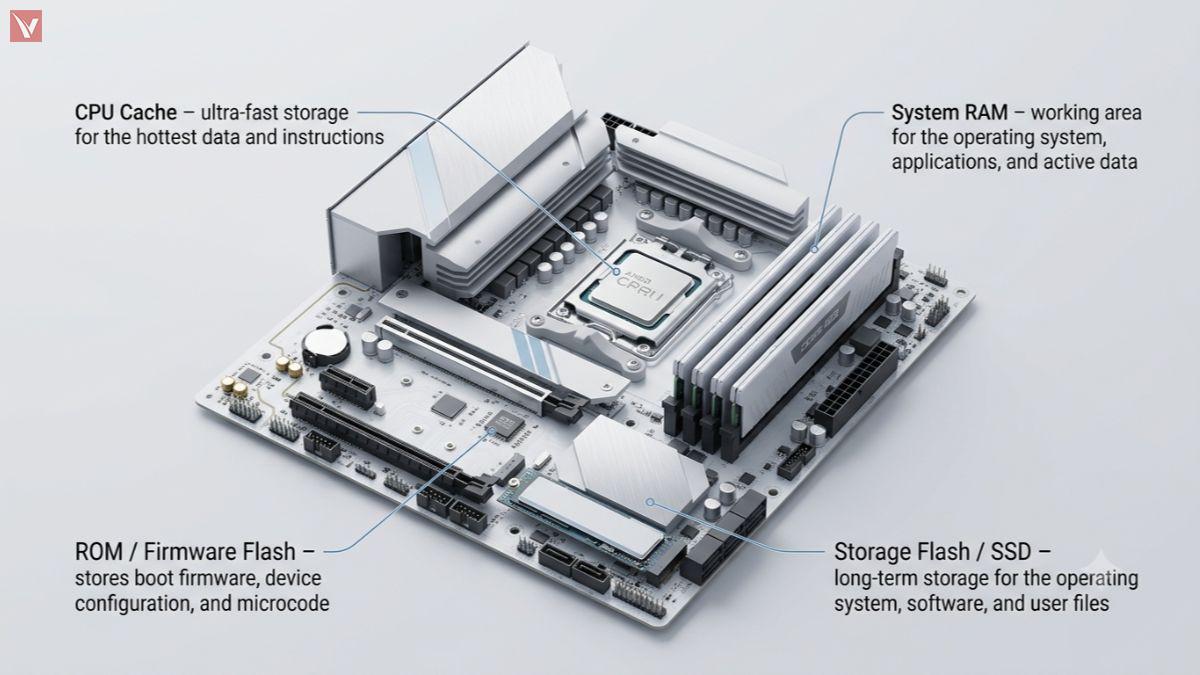
Typical Memory Roles in a Computer
| Memory type | Main role | Volatile |
|---|---|---|
| CPU cache | Ultra-fast storage for hottest data and instructions | Yes |
| System RAM | Working area for OS, applications, and active data | Yes |
| ROM / firmware flash | Boot firmware, device configuration, microcode | No |
| Storage flash (SSD) | Long-term storage for OS, software, user files | No |
Primary Categories of Computer Memory Chips
From a high‑level perspective, computer memory chips fall into two broad categories: volatile and non‑volatile. Volatile memory, typically referred to as random access memory (RAM), loses its contents once power is removed. Non‑volatile memory, often grouped under ROM or flash technologies, preserves data even when the system is turned off.
RAM vs. ROM
| Category | Representative types | Data retention | Typical use |
|---|---|---|---|
| RAM (volatile) | DRAM, SDRAM, DDR3/DDR4/DDR5, SRAM | Data lost when power is off | System memory, caches, buffers |
| ROM / NVM (non-volatile) | Mask ROM, NOR flash, NAND flash, EEPROM | Data retained without power | Firmware, configuration, long-term storage |
RAM is optimized for speed and frequent read/write operations, which is exactly what active software workloads require. Non‑volatile memory prioritizes persistence and density, enabling firmware storage and high‑capacity solid‑state drives that retain information across power cycles.
Deep Dive into Specific RAM Architectures
Within the RAM family, two fundamental architectures dominate: static RAM (SRAM) and dynamic RAM (DRAM). Each uses a different circuit concept to store bits and targets different points on the speed, density, and cost spectrum.
SRAM stores each bit using a small flip‑flop made of several transistors, which can hold its state as long as power is present without needing refresh cycles. This design enables very low access latency and high speed, making SRAM the preferred technology for CPU caches (L1, L2, L3) and other timing‑critical buffers. However, because each bit requires more transistors, SRAM is relatively expensive and less dense, so it is used in smaller capacities.
DRAM, by contrast, represents each bit as charge in a tiny capacitor controlled by a single access transistor. This structure is significantly more compact, allowing much higher storage density and lower cost per bit, which is why DRAM underlies most system memory modules (e.g., DDR4, DDR5). The trade‑off is that capacitors leak charge and must be periodically refreshed, introducing higher latency and complexity in the memory controller.
SRAM vs. DRAM comparison
| Attribute | SRAM | DRAM |
|---|---|---|
| Storage cell | Flip-flop using multiple transistors | Capacitor plus single access transistor |
| Need for refresh | No | Yes, periodic refresh required |
| Access speed | Very fast, low latency | Slower than SRAM, but still fast |
| Density and cost | Lower density, higher cost per bit | Higher density, lower cost per bit |
| Typical usage | CPU caches, small high-speed buffers | Main system memory (DIMMs, SoC DRAM) |
If you want a deeper comparison of memory technologies, read our guide on SRAM vs DRAM.
Beyond the core cell architectures, DRAM has evolved through multiple generations (SDR, DDR, DDR2/3/4/5), each bringing higher data rates and improved power efficiency. For system designers and buyers, understanding whether a design uses, for example, DDR3L versus DDR4, can have major implications for power budget, throughput, and supply chain availability.
Technical Parameters for Component Selection
Selecting the right memory chips for a computer, server, or industrial controller is always a multi‑dimensional engineering decision. Electrical, mechanical, and system‑level considerations must all align with application requirements and long‑term lifecycle support.
Some of the most important technical parameters include:
- Data rate and bandwidth Memory speed is typically specified as a data rate (for example, 3200 MT/s for DDR4‑3200) and an effective bandwidth per channel. Higher data rates support more demanding workloads, but they also require compatible controllers and careful signal integrity design.
- Capacity and organization Designers must consider not only total capacity (such as 8 Gb per chip or 16 GB per module) but also the organization (x8 vs x16, number of banks, ranks per DIMM). The organization affects how many devices can be placed on a bus and how the memory controller maps addresses.
- Latency parameters Timing parameters such as CAS latency (CL), RAS to CAS delay, and tRC determine how many clock cycles are needed for specific operations. Lower latency improves perceived responsiveness for many workloads, but may come at higher cost or tighter design margins.
- Voltage and power consumption Modern memory standards have trended toward lower operating voltages to reduce power and heat, for example DDR3 at 1.5 V, DDR3L at 1.35 V, and DDR4 around 1.2 V. In many systems—especially compact embedded or battery‑powered devices—memory power can be a significant fraction of total consumption.
- Signal integrity and PCB layout High‑speed memory interfaces are very sensitive to impedance control, trace length matching, and termination strategies. Poor PCB layout can cause reflections, crosstalk, and timing violations that lead to intermittent or hard failures, regardless of how high‑quality the memory chips themselves are.
- Package type and thermal conditions Memory chips come in various packages such as BGA, TSOP, or custom module formats. Designers need to check package dimensions, pin pitch, and thermal characteristics versus their board stack‑up and cooling strategy.
Because memory chips are extremely sensitive to supply voltage stability and noise, they are usually paired with well‑designed power delivery networks. In practice, this often means integrating high‑precision DC‑DC converters, low‑ESR decoupling capacitors, and careful ground plane design to ensure that the memory rails remain stable under fast load transients.
Reliable Procurement Strategies for Electronic Components
Even the best technical design can be undermined by an unreliable supply chain. Memory chips and other semiconductors are cyclical commodities, and the market regularly experiences tight supply, extended lead times, and sharp price swings. Design engineers and purchasing teams must plan for these realities to avoid production delays and unexpected costs.
Key risk factors include sudden demand shocks in the broader electronics market, foundry capacity constraints, and product discontinuities as manufacturers migrate to newer technology nodes. Counterfeit and sub‑standard components are another serious concern, especially when sourcing from unfamiliar brokers or in times of acute shortages. Robust testing, traceability, and vendor qualification processes are crucial to maintaining product quality and protecting end users.
Partnering with Vigor Components for Your Supply Chain
Navigating these complexities is much easier with a strong independent distribution partner that focuses on quality and responsiveness. As a global independent electronic components distributor, Vigor Components is positioned to support OEMs, EMS providers, and repair organizations with agile sourcing across mainstream and niche memory products.
By leveraging a broad network of vetted suppliers and rigorous incoming inspection, Vigor Components can help you secure genuine DRAM, SRAM, flash, and logic devices even when the market is tight. For customers facing urgent shortages or last‑time‑buy scenarios, Vigor’s team can support cross‑referencing, BOM optimization, and cost‑down strategies without sacrificing quality or reliability. Through end‑to‑end support—from demand planning and stock buffering to logistics coordination—Vigor Components aims to reduce supply risk so that engineering teams can focus on building better systems.
If you are currently evaluating memory chips for a new design or facing challenges securing specific part numbers, would you like the article to emphasize more server/PC applications or industrial/embedded systems as the primary use case?
Once you have defined your technical parameters, the next step is sourcing. You can explore the 11 leading memory chips manufacturers in 2026 to find the right supplier for your DDR5, HBM, or industrial NAND requirements.